CORA™ Online Help
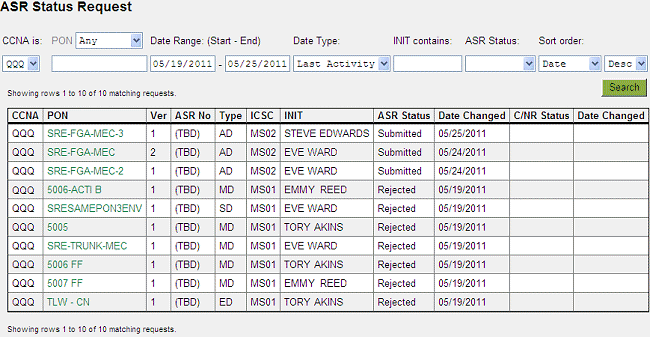
On the ASR Status Request screen, specify criteria to limit the information returned on the ASR search.
You must select a CCNA.
To view requests for specific PON text, select a PON choice from the PON drop-down menu (Any, Equals, or Contains) and enter part or all of the PON depending on the choice selected in the drop-down menu. For example, to display all requests with PONs containing the letters ABC, select Contains in the drop-down menu and enter ABC in the PON field.
To view requests for a specific time frame, enter start and end dates in the Date Range fields.
To view requests submitted by a specific initiator, enter the initiator's name or partial name in the INIT contains field.
To view requests by a specific status, select the status in the ASR Status drop-down menu.
By default, requests are listed by date in descending order. To change the sort order, select the sort order you want from the Sort order drop-down menu and select either Desc (descending) or Asc (ascending).
Click Search. Requests that match your search criteria are listed. If the search results contain over 50 requests, use the Next>> and <<Previous links to view additional requests.
To learn more about ASR summary results, see Viewing ASR Status Summary.